Back in 2019 I wrote about moving my side projects from dokku to Google Cloud Run. I loved dokku’s git push workflow but got tired of tending a Linux box like a pet. Seven years later I’ve come full circle, and then some: my apps live on a Mac mini in a closet again, and I couldn’t be happier about it.
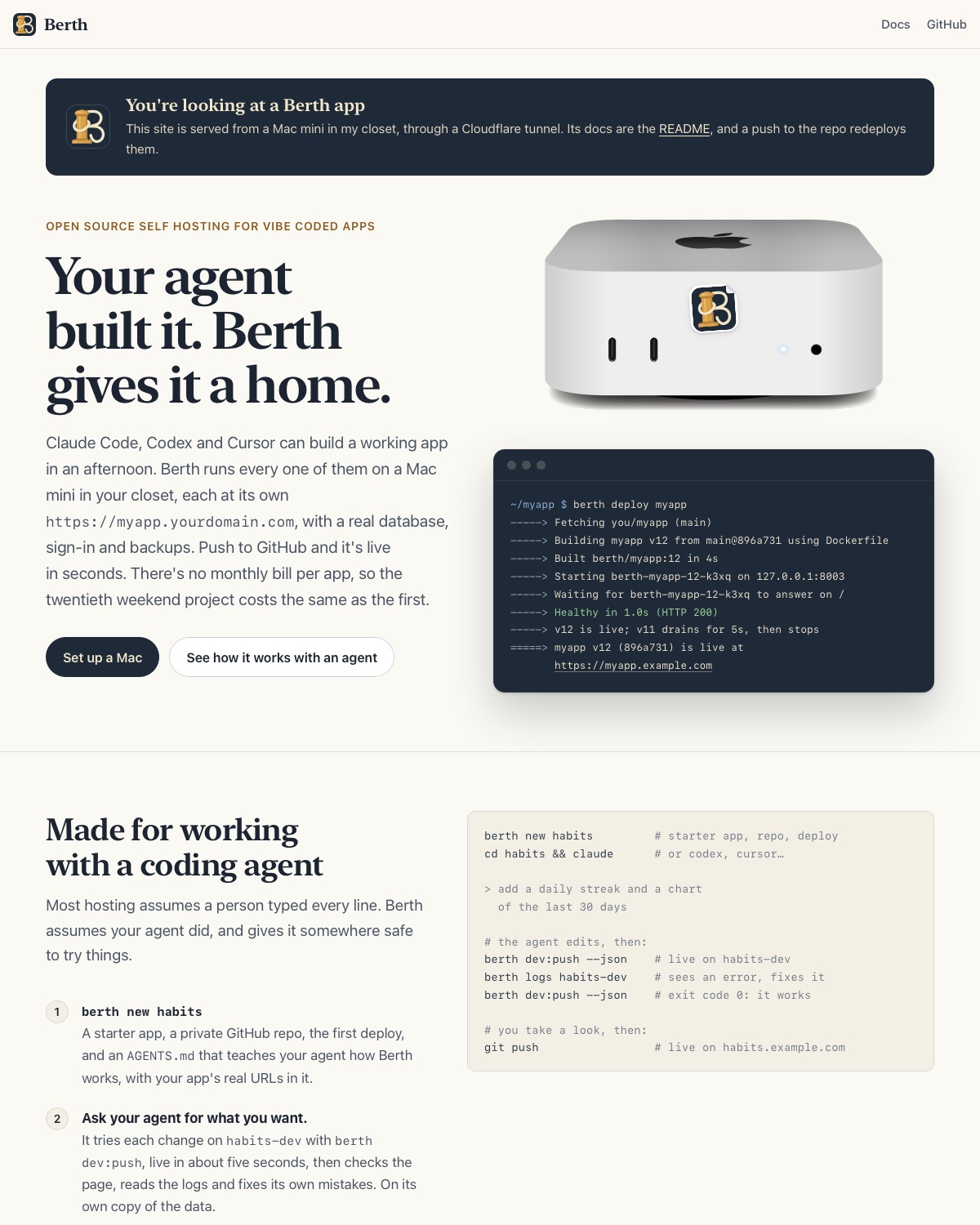
Today I’m open sourcing the thing that made that possible. It’s called Berth, and it’s a dead simple PaaS for Mac minis. You push to GitHub, and a few seconds later your app is live at https://myapp.yourdomain.com, running in its own little VM on a Mac in your closet. Postgres is one command away.
Why now?
Something changed in how I make software this year. As I wrote when coding agents crossed a chasm, the question “is this worth building?” has basically disappeared for small tools. Claude Code can build me a working app in an afternoon, often in a lot less. The result is that I have a pile of small apps: a sports scores app, little utilities, experiments, and things I make for friends.
Every one of them needs a home. Hosted platforms are great, but each new app means another project to set up, another database to provision and either another monthly line item or another free tier’s limits to live within (apps that sleep, databases that expire). It adds up, in money and in friction. And the old self-hosting answer means a weekend of nginx, certificates, systemd units and port forwarding before anything is even live.
I wanted the old Heroku feeling (push, and it’s live) without either. It turns out a Mac mini is a wonderful home for exactly this. It’s quiet, it sips power and the M4 with 16 GB I have in the closet is happily running eleven apps and a few databases right now with room to spare.
What it does
Berth is the glue around three excellent pieces of software:
- Apple’s
containerruntime gives every app (and every database) its own lightweight Linux VM, with its own kernel, so a compromised app can’t get at the others or at macOS. - Caddy routes each hostname to the right app.
- A Cloudflare tunnel puts it all on the internet without opening a single port on my home router.
Getting going looks like this:
brew tap arfct/berth https://github.com/arfct/berth
brew trust arfct/berth
brew install berth

berth init --domain example.com           # once
berth create myapp --repo you/myapp       # once per app
git push                                  # every deploy after that
No ports opened on your router, no certificates, no YAML, no Docker Desktop, and no sudo once it’s set up. Each push builds the app, starts the new release in its own VM, health checks it and only then switches traffic over, so deploys don’t drop requests. If something goes wrong, berth rollback puts the previous release back.
Every piece of Berth exists because something was annoying without it:
- Databases.
berth pg:creategives an app its own Postgres (Redis and SQLite work too). - Sign in with Google. I got tired of writing the same OAuth code for every little app, so Berth puts Google sign-in in front of any app and tells the app who’s signed in with a request header.
berth access myapp allow @familyand you’re done. - AI for your apps.
berth ai:enable myapphands an app an OpenAI and Anthropic compatible endpoint which routes to cloud models (with keys the app never sees) or small local models running on the Mac’s own GPU. - Backups. Databases are dumped every night, and
berth offsite:setupsends an encrypted archive of everything somewhere that isn’t the Mac (Cloudflare R2, say) every night too.berth restoreon a fresh Mac brings every app back, redeployed at the commit that was live.
The part I use most: a place for agents to try things
Most hosting assumes a person typed every line. Berth assumes your agent did, and gives it somewhere safe to experiment.
Every app gets a dev version at https://myapp-dev.yourdomain.com. From the app’s repo, berth dev:push deploys the working tree exactly as it is on disk, uncommitted edits and all, in about five seconds. Production is never touched. And it’s built for agents rather than people: it waits until the deploy is done, prints JSON if you ask, and has exit codes that tell an agent what went wrong (the build failed, it built but didn’t start, or a migration failed).
berth new habits makes a starter app, its GitHub repo and an AGENTS.md that teaches your coding agent how all of this works. So the loop looks like: ask Claude Code for a feature, it pushes to the dev version, reads the logs, fixes its own mistakes and pushes again, and only when you’ve taken a look does anything reach production with a git push. It’s a really nice way to work.
What it isn’t
It’s one Mac. There’s no failover, and if the power goes out while I’m on holiday my apps are down until it comes back. That’s the right trade for side projects, internal tools, family apps and prototypes. It’s the wrong one for anything where an hour of downtime costs real money, and the README is upfront about that.
Built the same way
Fittingly, Berth was itself built with a coding agent. I started it on October 24th and Claude Code co-authored 50 of its first 58 commits, from the design doc through to zero-downtime deploys, Google sign-in and off-Mac backups, with me setting the direction and trying everything on the real Mac. It still feels slightly unreal how much ground that covers in two weeks.
The first real app I built on top of it is a journal app called Tekkoh, which I’ve written about separately. Its server, web app and database all live on Berth.
Try it
Berth is open source under the MIT license.
- The code and the (very thorough) docs are at github.com/arfct/berth.
- berth.computer is the homepage, and of course it’s a Berth app too, served from the Mac in my closet.
You’ll need an Apple Silicon Mac on macOS 26 or later, a GitHub account and, for public URLs, a domain on Cloudflare (the free plan is fine). If you try it, I’d love to hear how it goes. Issues and pull requests are very welcome!