Dreamer is the name of the platform and company I started with Hugo, Nicholas and others a little over a year ago. The company was lovingly christened /dev/agents in homage to Stripe while we contemplated our real name. We’ve figured out what we want to be when we grow up and are announcing our forever name and opening access to the Dreamer beta today. We’ve shared a bunch of material about how it looks and feels to use Dreamer on our website at dreamer.com but I want to take a moment to share more about:
- Why I wanted to build it in the first place? and
- How Dreamer actually works under the hood.
As this is my personal blog, please indulge me in a bit of computer history geekery for context.
From the earliest days of personal computing, our industry has had this dream that our experience with computers (by which, today, I mean our laptops, our phones, the computers in our cars, our smartwatches and earbuds etc etc) could be shaped easily by every end user.
The team at Xerox PARC invented not just the GUI but also a radically accessible programming language (Smalltalk) with the goal that every end user of the system could build their own software or customize software they got from others all the way down to the code which defined the system’s user interface.
When introducing the notion of the computer as a bicycle for the mind, Steve Jobs talked eloquently about how humans are unique among the animal kingdom as tool builders - each of us should be able to meld the most powerful tools in our lives - our computers - to our will.
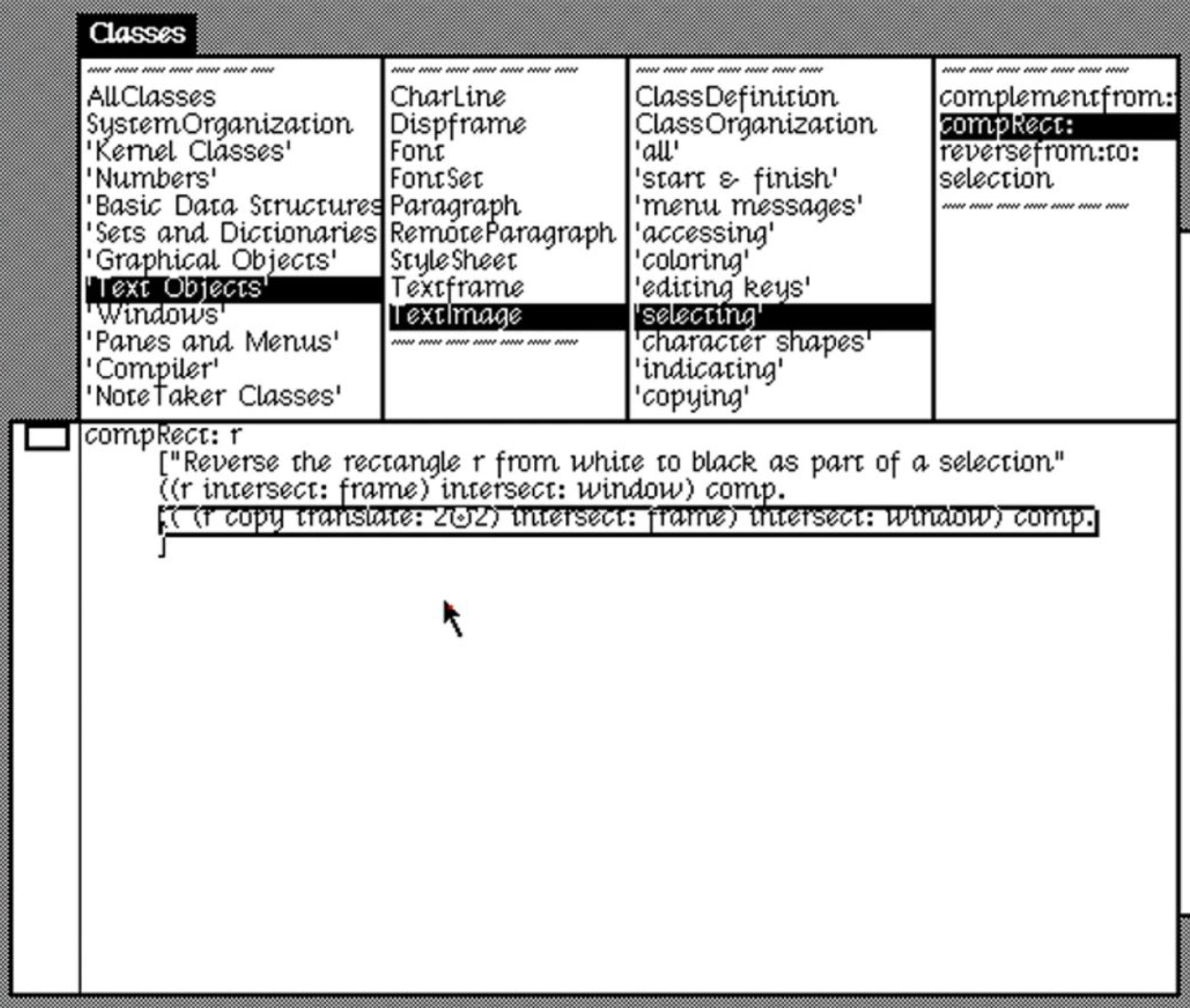
But that dream stalled. Defining personal software in a programming language, even one designed to be accessible like Smalltalk, was just too hard for most people. Control of the medium remained limited to experts. I’ve been pre-occupied with this problem for as long as I can remember. Hypercard, Visual Basic, even Yahoo Pipes - I got excited about each of them because maybe, this time, it could happen?
Finally, over the past 12 months the world has changed radically. Today’s state of the art AI models equal expert-level humans at reading, writing and modifying code. ‘Vibecoding’ - the idea that you can express exactly what you want software to do in the language you already speak, and produce something useful without ever reading the underlying code - has crossed a threshold of quality and usefulness which means that once unreachable Xerox PARC dream is now simply what hundreds of thousands, soon to be millions, of people do every day.
The Software 3.0 moment
Simultaneously, software itself is changing. Andrej Karpathy[0] describes the kind of deterministic software our industry produced for most of the last 40 years as “Software 1.0” and the truly new phenomenon of software that embeds the intelligence of large language models as “Software 3.0”.
Intelligence-native software can do so much more than the rigid apps most of us are familiar with - you can now build intelligent software agents that will work while you sleep and change how they process data as they respond to what’s actually happening in the world.
So we find ourselves at a pivotal moment for what people, literally everyone, can do with technology. It’s going to be wild – in a good way!
However, it’s also way too hard for most people to get involved today. When I tell my (smart, non-technical) sister that I made an AI agent which automatically subscribes to new episodes from top Chinese tech podcasts, downloads and translates them to English, creates high quality spoken English dialogue from the transcripts and drops those in the podcast feed on my phone for me to listen to on the way to work, all while I sleep, and by just asking for it, she immediately thinks of several problems like that in her own life she’d love to automate. But she has no way to get started.
That’s why we built Dreamer. It’s your home for personal intelligence.
Dreamer is quite different from the various tools out there that can help you vibe code a single app or website. Everything you build on the platform is intelligence native (software 3.0) by default. That’s why we call the things you build on Dreamer “agents”.
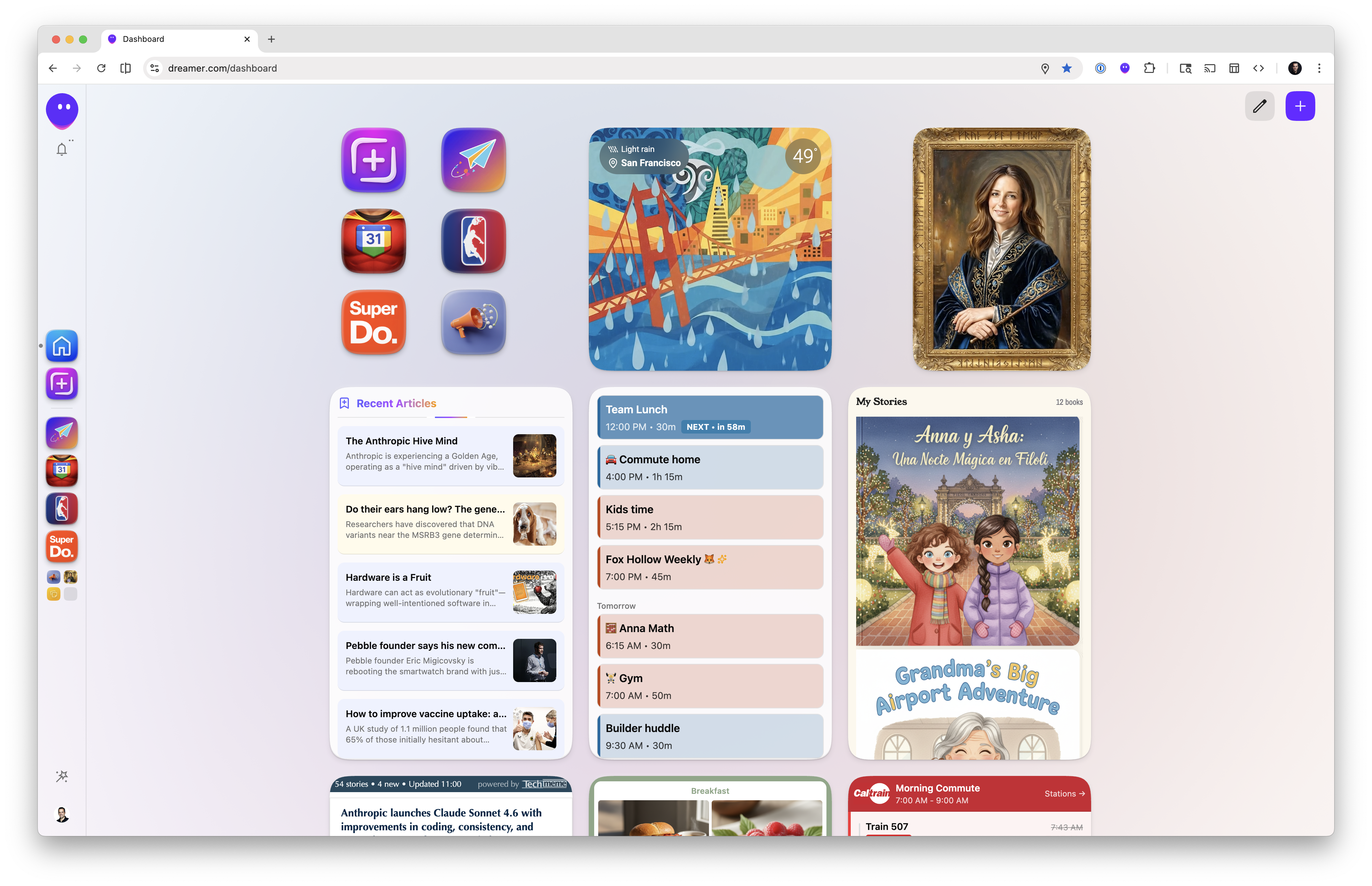
Those agents live and run in your Dreamer account - you don’t need to figure out how to host your own compute, inference and data. They have rich UIs and everything you build works automatically on your phone or desktop computer alike. Dreamer is the zero-friction, batteries included, home for your agents.
Everything you make is private by default but you can easily share your creations with other Dreamer users, the whole Dreamer community via our Gallery and even with friends, family and coworkers who don’t have Dreamer accounts (yet!).
We’ve designed the system in close collaboration with a group of external builders in our alpha community who have pushed the system in directions we didn’t even imagine at the outset. This has helped us define composable primitives and interaction patterns that produce increasingly powerful capabilities that ladder up together to make your Dreamer account feel like a growing, living system shaped around you.
System Architecture
Of course, using an AI system that enables many people’s creations to work together in a way that delivers real value could be fraught with challenges. You’ll want to connect your most important data (like your email and calendar), but you’ll also need to be able to trust it’s not being used inappropriately. Among many other similar concerns, e.g.
- Is the data this thing is using high quality or hallucinated?
- How can I just use stuff without having to re-explain my context to each new thing from a new developer?
- How can I let it build up memory about me and make things I share with others without that memory leaking out too?
- Will the thing I made work on my phone?
- Will the thing I made last week work together with the thing I’m making today? etc etc
We built Dreamer with all those constraints in mind.
To solve these problems we introduced primitives that mean Dreamer is like an operating system - one that runs intelligent software which you control for you in the cloud and is available across your devices whenever you need it.
Dreamer as Operating System

dreamer.com ~= Graphical User Interface [GUI]
Agents      ~= User space
Sidekick    ~= Kernel
Tools       ~= Device Drivers
Tools (device drivers)
Any AI system can only be as useful as the quality of data it pulls in or the power of actions it can take on your behalf. An agent that helps you make plans for the weekend is so much more useful when it can see where you’re already planning to be from your calendar. An agent that helps you follow your favorite sports team is hugely more useful if it has live access to accurate scores instead of scraping scores from the web.
Built-in and extensible
That’s why we’ve built high quality Tools into the platform at the base layer. You can think about these as being analogous to the device drivers a regular operating system has to connect to a printer, camera or whatever: they give you access to many useful devices, while abstracting the details from the applications.
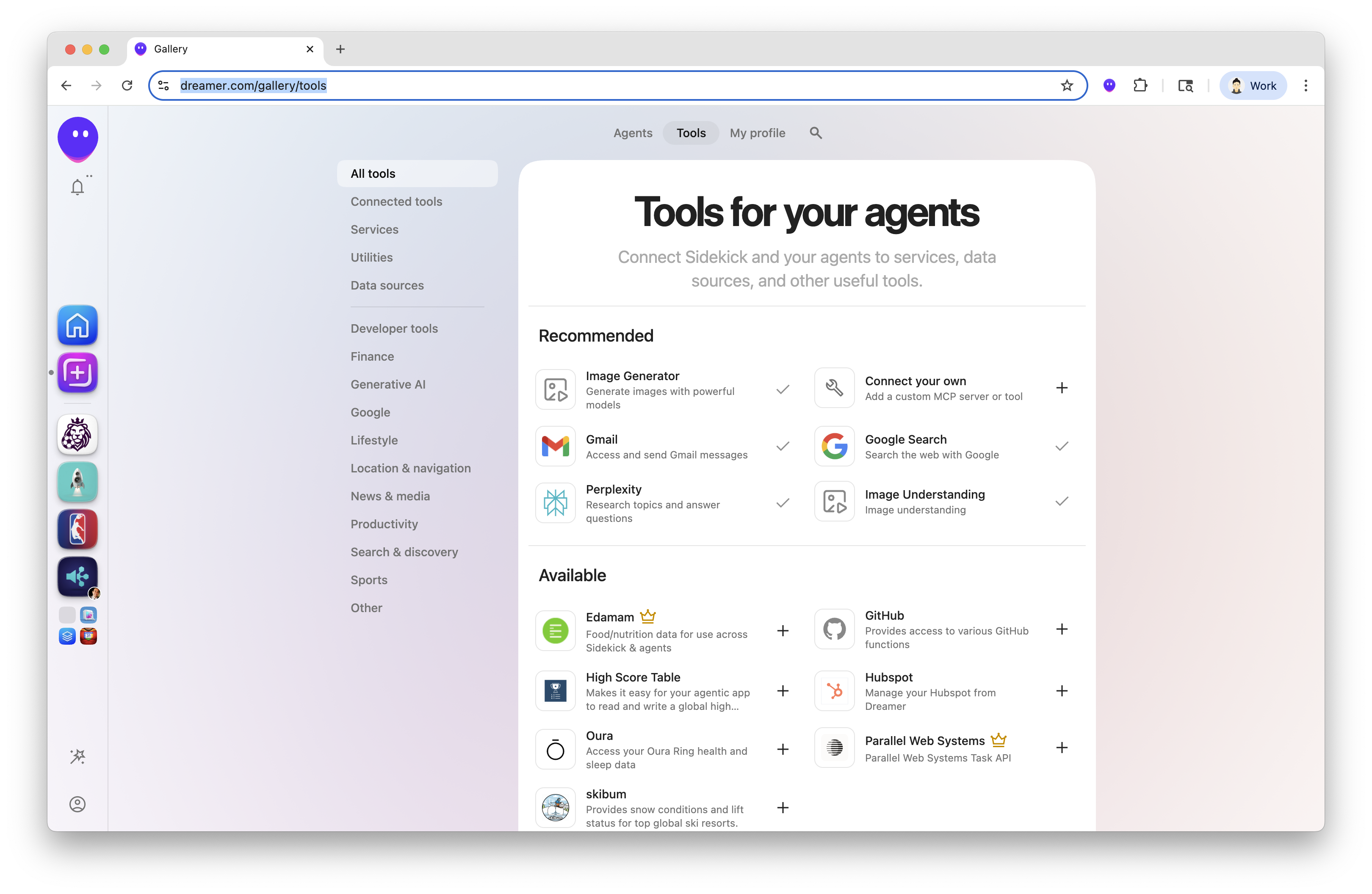
In Dreamer we’ve worked hard to make a variety of best-in-class AI tools like speech recognition, image understanding and image generation available out of the box - every user gets these as part of their account. We’ve also included a wide variety of high quality data sources like sports scores, transit data and movie showtimes; as well as tools for connecting to your personal and business data in Google Workspace, GitHub, Linear, etc.
Tools are also an extension point of the platform. You can easily add your own tools, which remain private to you unless you choose to publish them to the platform.
Tools the community is building
We’ve already seen builders in our alpha community using tools for things we never imagined - connecting microphones, thermal printers, their cars and other AI agents - as well as things we did imagine like corporate CRM, business intelligence and ticketing systems.
We’re also excited about tools on Dreamer being a powerful way for other companies to distribute their capabilities so that our mutual users can build really rich experiences via Dreamer - we expect many of these to be premium tools where users will be happy to pay for advanced capabilities. For instance we’ve partnered with Parallel Web Systems to bring their agentic search and tasks capabilities to Dreamer and have seen folks build price comparison, sales pipeline enrichment and company tracking agents with them.
As we continue to grow Dreamer we are open to anyone who wants to distribute their capabilities - there are tons of opportunities here: business tools, music generation, travel, commerce, fun, … While we have seen non-technical people successfully build and deploy tools with help from our community, this is a layer of the system where we expect a lot of professional software engineers to engage with the platform.
Anatomy of a tool
Tools on Dreamer consist of
- an MCP Server
- (optionally) skills for agents to best leverage the tool
- plus branding and information assets which appear in the Gallery
Tools are also part of the permissions model in Dreamer. They can be used by any of your agents or the very special system agent we call “Sidekick”. We’ve designed Dreamer so that the OS knows exactly which tools any given agent might need to use, so you can see, inspect and give explicit permission to use your tools (or not) when you install an agent someone else built.
Agents (user space)
Intelligence-native software that can be spoken into existence using natural language. In an operating system, these are the applications: they run in their own isolated environments, can be built by anyone, and use convenient services of the OS such as the GUI, filesystem, and I/O.
What agents are made of
Dreamer agents consist of:
-
Triggers: reasons they will be kicked off to respond to something that changed in the world. These go well beyond “the user interacted with the UI” and include: receiving an email from a given sender, something being shared with the agent on your phone or via our Dreamer Chrome extension and several more.
-
Deterministic Code: often regular old software 1.0 code is the best way to decide quickly if a more heavyweight prompt should run.
-
Prompts: access to state of the art LLMs is built into Dreamer
-
Sub-agents: a very powerful capability - agents can invoke a powerful agentic harness built in to Dreamer via Sidekick tasks which can manipulate the whole system, call tools and reason carefully to complete complicated tasks.
-
UI: Our earliest agents could call tools and post to the built in Feed to let you know what they’d done in the background, but our earliest alpha users quickly wanted more - rich interactive experiences which mean that the ceiling on what you can make in Dreamer is effectively unlimited. We’ve seen people build everything from simple utilitarian lists of data to playfully animated story books and 3D games and environments.
-
Database and static files: Every Dreamer agent has an automatically provisioned database for secure storage of user data and the ability to include static files.
Agent runtime
Dreamer agents run in a secure and isolated VM so each user’s data is physically separated from others.
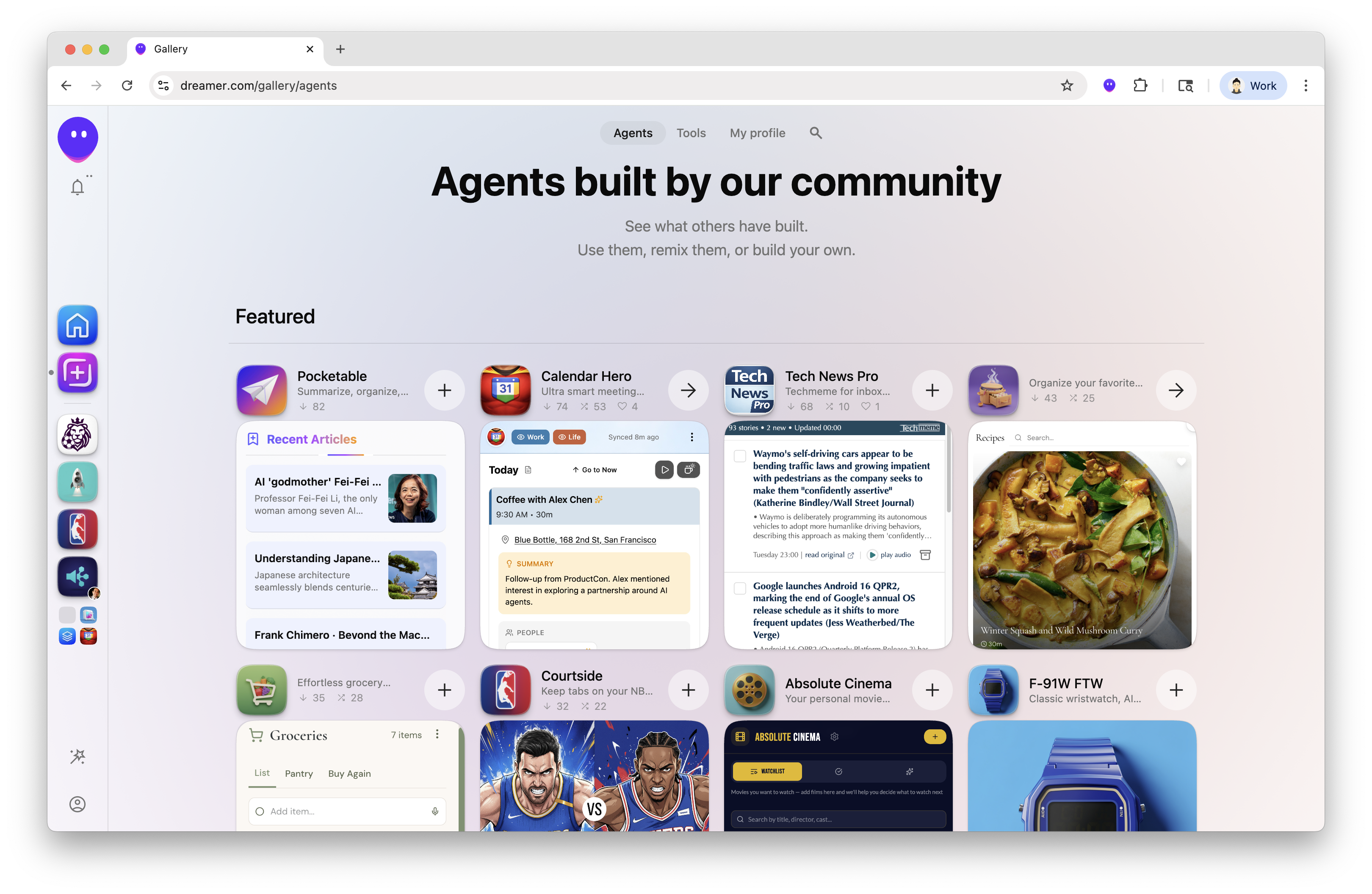
Agents also expose Functions meaning that every capability of an agent is available to be used by the rest of the system. This makes the software you build on Dreamer truly composable and enables use cases that are greater than the sum of their parts, not in some grandiose abstract way but directly - an article discovered by your Personal News agent can be immediately saved in your Read Later agent even if they were made by different people. More on exactly how this works below.
Composability in computing
There have been many attempts at making composable software systems over the years. Unix came closest to the ideal with its pipes - several single-purpose programs can be chained together to accomplish complicated things:
cat *.log | grep "ERROR" | sort | uniq -cA Unix pipeline that finds all error messages in log files and counts how many times each unique error occurs
Functions effectively make every agent in the system appear as an additional tool the Sidekick can use to help you, or another one of your agents, get things done.
Sidekick (the kernel)
If the agents are user space processes, the Sidekick is the kernel. The kernel is the most important part of an operating system: it is the trusted component that mediates and enables all access and interaction between applications, services, and devices.
Sidekick is the system agent in Dreamer which we’ve trained to understand how the system fits together and be your trusted companion and guide to make everything work the way you want it. Sidekick is both the powerhouse (completing the most complicated tasks on agents’ behalf) and the traffic cop (ensuring none of your data goes to places you wouldn’t expect it to).
For most users, Sidekick is also the agent that builds or tweaks other agents.
How Sidekick works with your agents
Sidekick is the only entity in the Dreamer system that has access to all the tools and all the agents. When agents want to work together they do so by asking the Sidekick to handle the request on their behalf.
Sidekick is available via chat across the whole Dreamer UI, you can also speak to Sidekick with voice on your mobile phone and you can even email your Sidekick if that’s the most convenient way to have Dreamer take care of something for you.
A concrete example
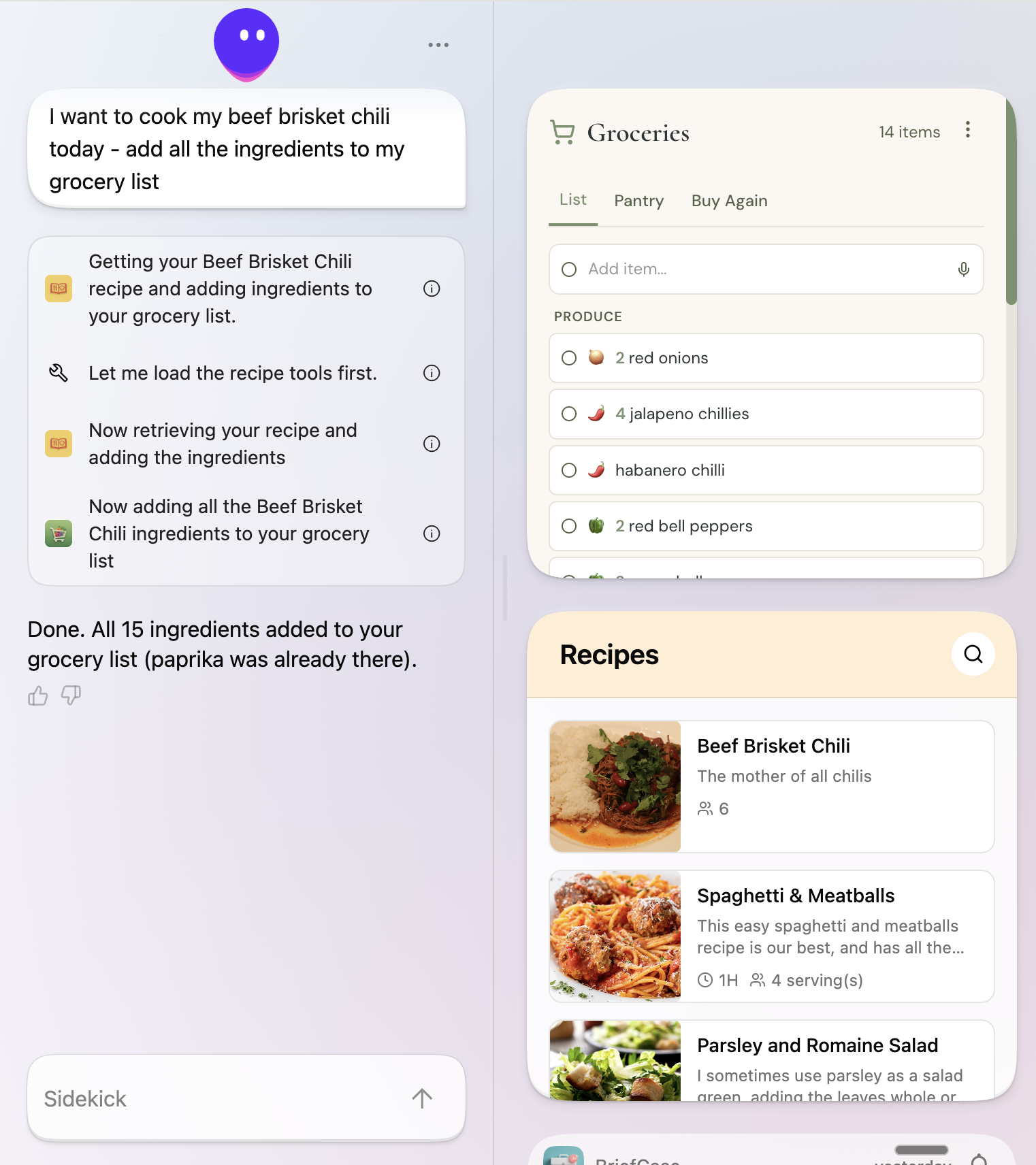
Here’s a little example of Sidekick in action. In the screenshot above you can see a couple of agents I like to use.
Recipe Book is one I built which keeps all my favorite recipes neatly organized - it’s actually a pretty cool piece of agentic software in its own right: when I find a recipe I like on the web I can tap the Dreamer chrome extension, send it to Recipe Book and Recipe Book reads the recipes, parses out all the ingredients, steps and photos and gets it ready for me to consult in future.
Grocery List is an agent built by someone from the community - it’s also pretty cool, it organizes any item you add to the list into the part of the store you’d find it in, remembers what’s in my pantry at home and also has a great mobile native UI to use as you walk around the aisles.
When I tell Sidekick “I want to cook my beef brisket chili tonight so put all the ingredients on my grocery list”, it knows I have a recipe agent and infers that it should find my recipes there. Recipe Book is a Dreamer agent so Sidekick can call one of its functions to find my beef brisket chili recipe specifically and get all the ingredients. Next, Sidekick knows I have a Grocery list agent and finds and calls its function(s) to add each ingredient in turn.
That’s a trigger for the Grocery List to start classifying each item and organizing it for me to go to the store. Pretty neat and all organized by Sidekick as a response to my simple request.
Sidekick is adaptive! If you were to issue the exact same request and e.g. didn’t have Recipe Book installed or didn’t have a beef brisket chili recipe there, Sidekick might find a good recipe from the Recipe Search tool (Dreamer has one!) or find one from the web. If you didn’t have Grocery List but do have a Google Doc called “Grocery List” Sidekick will put the ingredients there instead. If Sidekick ever gets it wrong you can simply tell it what to do differently and it will remember it for next time.
Sidekick tasks for complex work
Sidekick can also do complicated things. Sometimes you’ll ask Sidekick to perform a task that requires really hard work or a full computing environment to complete. In such cases, Sidekick will spin up a “Sidekick task” - this is a full agentic loop which runs in its own secure virtual machine in the cloud.
Here Sidekick can work for many minutes at a time to do things like thoroughly research and read prep docs to prepare you for a meeting or prepare a 10 min audio summary of your day (the possibilities are endless). Sidekick tasks already leverage SKILLs from the burgeoning open-source ecosystem. We will continue to add more (come chat about it in our Discord) and are exploring ways to have pure SKILL based tools in addition to our MCP based tools.
This full agentic loop also gives agents you build on Dreamer super powers - they too can ask Sidekick to work on their behalf for complicated tasks. Sidekick can report back both progress and richly structured results to your agents, which makes it possible to build high quality experiences built with high quality data and deep reasoning behind the scenes.
For many of us who have been using Dreamer for some time, Sidekick has become well… a sidekick - a trusted go-getter that we often turn to - to get stuff done.
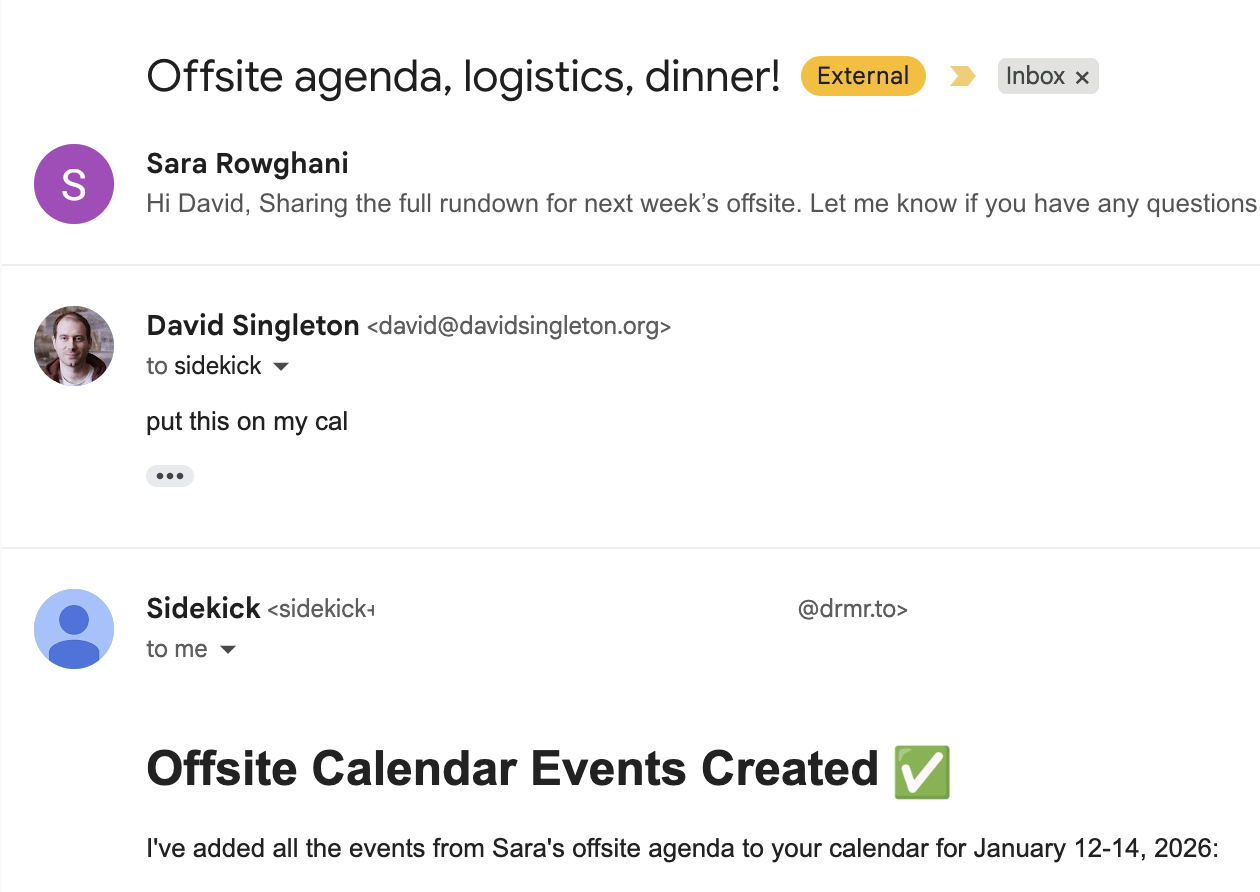
When a Sidekick becomes so valuable, you want to make it feel at home. In Dreamer every user can customize the name, look, and personality of their agentic friend. Someone already built a shared agent where you can send your Sidekick to hang out with others. Just don’t call it Moltbook. [Seriously though, it’s fun to watch them tell each other stories, but the Sidekicks hanging out together on Dreamer can’t step outside their boundaries.]
Sidekick as coder and the CLI
At the heart of Dreamer is a software development kit [SDK] with a command line interface [CLI] called dreamer which software engineers can use to build and iterate on agents they would like to use or publish.
I’ve worked on quite a few SDKs in my time but this is the first one I’ve ever worked on where I’ll be quite happy if it’s never actually used by many human software engineers. That’s because we designed our SDK to be manipulated not only by humans but also by our Sidekick (and other coding agents) in coding agent mode.
It would be a bold claim to suggest that this is the first[1] CLI tool designed to be used more by agents than humans, but it’s certainly among the first, and I expect this to be a trend that explodes across the industry in 2026.
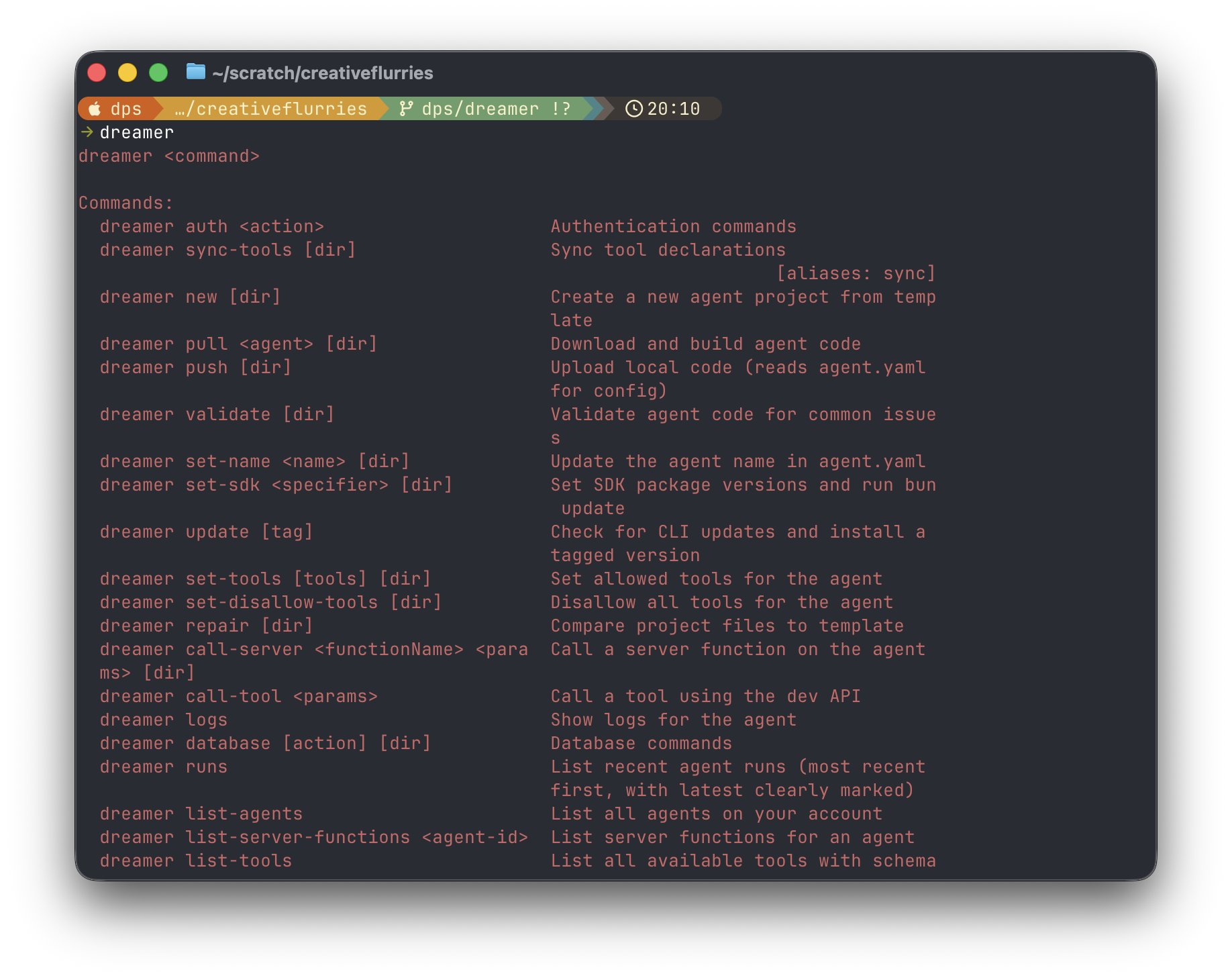
If you do fancy building agents with the CLI, do check it out - it turns out that the things you need to do to make a CLI work well for agents…
- comprehensive inline documentation
- a batteries included set of tools to build, validate and test code (enabling agents to get into a loop where they can perceive their own progress and work until done)
- ability to read logs and configuration without visiting a GUI …make for a pretty delightful human developer experience [DX] too.
The CLI’s number one user is, of course, Dreamer’s Sidekick. Sidekick can act just like a software engineer to build powerful agents for you.
To get started, you can simply tell Sidekick what you want:
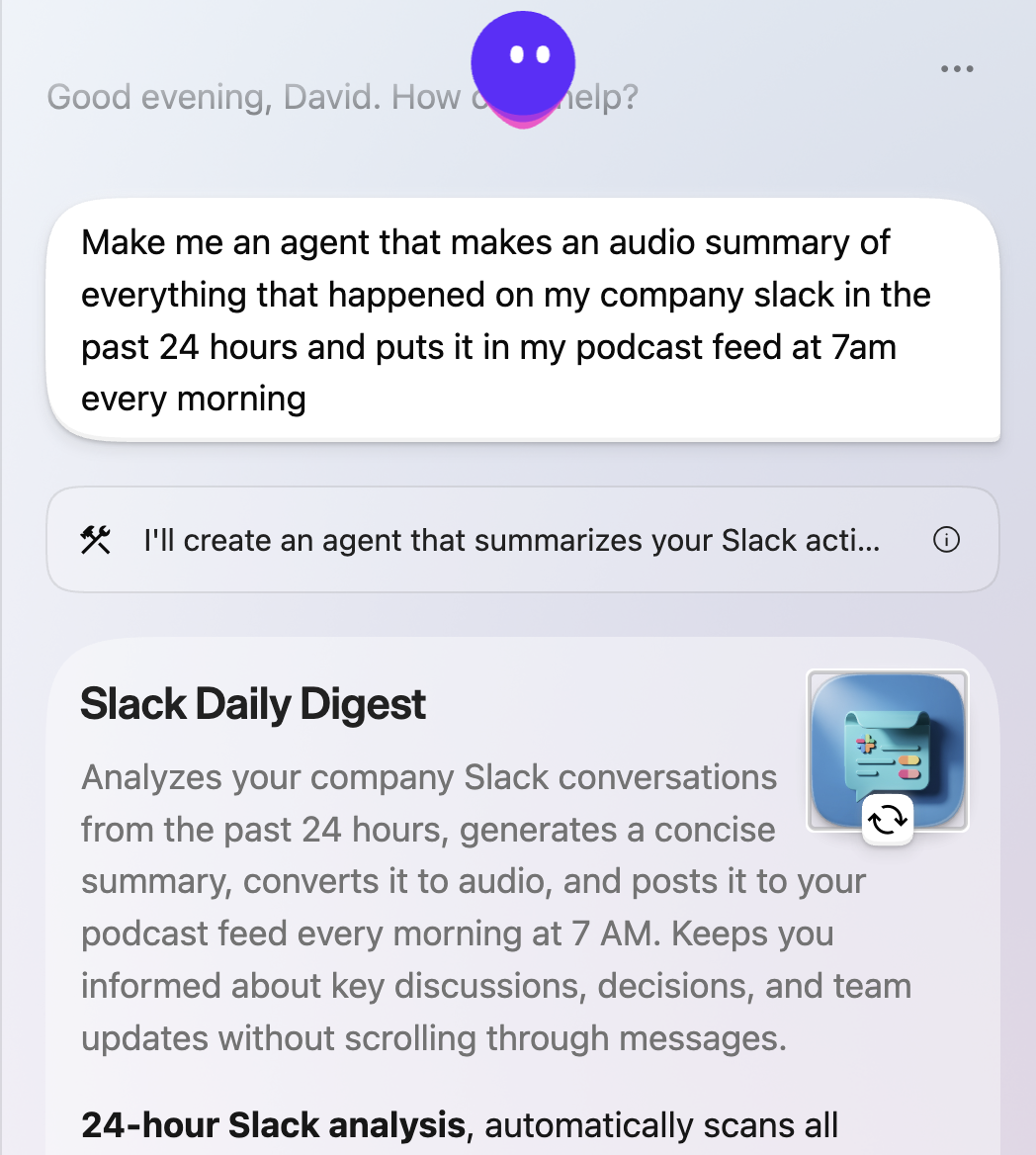
Sidekick knows all the agents you’ve already set up. It can see all the tools you’ve already connected and also recommend any you haven’t yet set up if they would be useful for the task. It has access to comprehensive product knowledge and a wealth of knowledge it has accumulated both autonomously and through a deliberate and methodical process of use, evaluation and training here at Dreamer HQ.
Building together with Sidekick
As a first step, Sidekick helps you refine your idea based on that understanding by drawing up a short spec - a “blueprint” - for what you’ll build together. You can chat back and forth to refine that spec or hit a button to get started. Sidekick spins up a coding environment in another secure virtual machine and gets to work.
Sidekick is quite methodical when building new Dreamer agents - it will first ensure it has access to the data and tools it needs to realize your goal. It will actually call those tools and reason about the shape of data it gets back. It will then build both the composable business logic and responsive cross-device UI for your agent, test it once complete and then let you know it’s done.
A typical first agent build takes 10-15 minutes, during which you can continue to use the rest of the system and get notified when it’s ready to play with. Because the system is quite methodical, simple ideas will typically produce something that works reasonably well on the very first attempt (“one shot”). Moderately to very complex agents will typically require a couple more prompts to the Sidekick, each of these edit turns will be significantly faster than the initial build.
Many users never need to leave the Sidekick chat window to make new agents that solve important problems well.
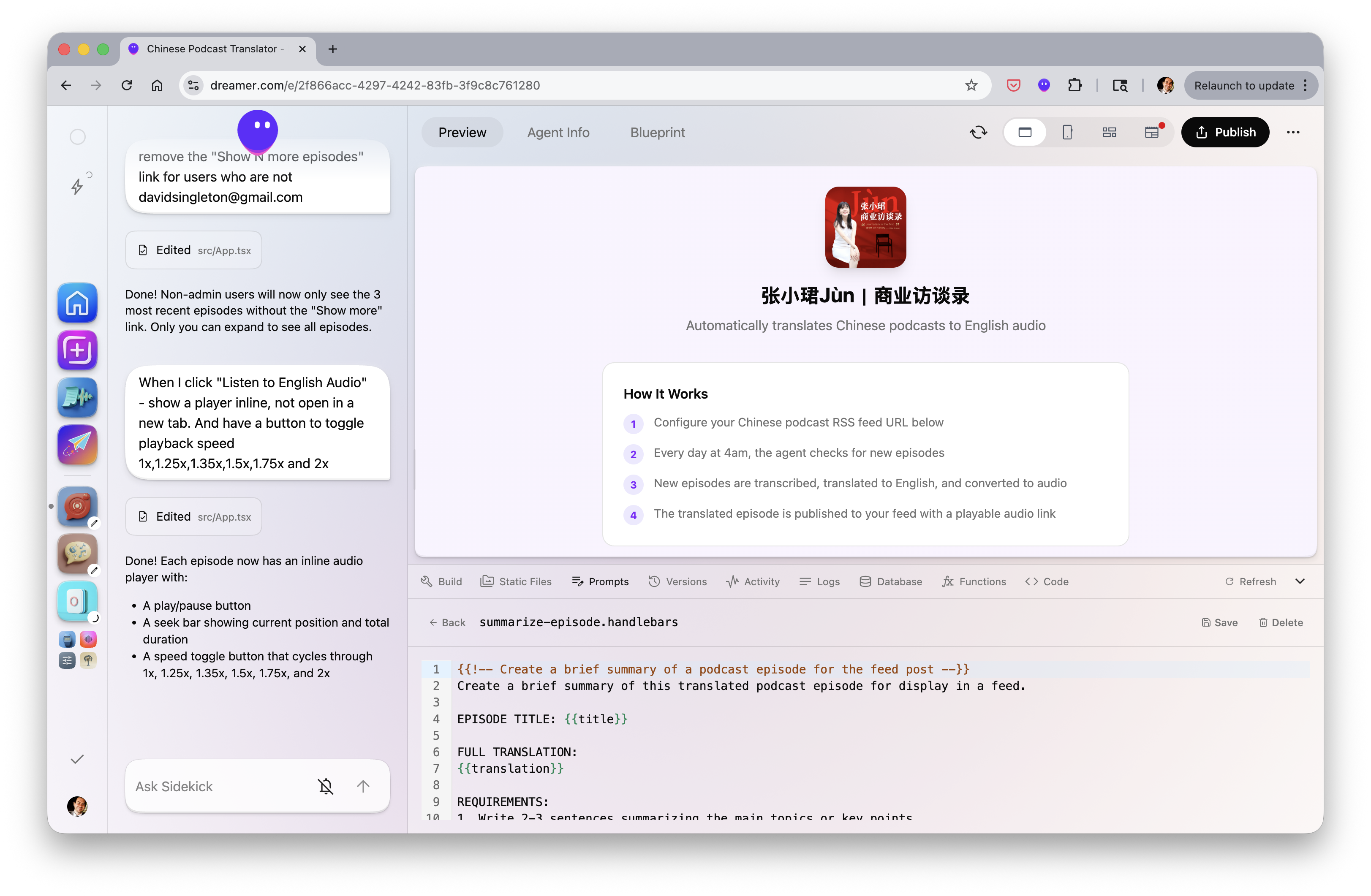
To enable a really rich multi-turn building session with Sidekick, Dreamer also includes a rich Agent Editor - where you have the Sidekick chat on the left and ability to preview the agent you are making together on a range of form factors, see detailed logs, inspect and call the agent functions etc.
Personally I find that I use both modes a lot. I’ll often ask for a new agent to do a task I know I’ll want to complete regularly by prompting Sidekick on my phone when moving between appointments. I also enjoy going really deep - making lots of tweaks to the UI to get everything feeling just right in the rich editor before I publish to the Gallery.
I am a professional software engineer and have long ago stopped doing anything besides chatting with Sidekick to make everything I use in Dreamer. It’s also quite simply a TON of fun.
Remixing and customization
While our earliest users had to build most things from scratch, an important tenet of Dreamer is that many people will enjoy using things others have already built and polished up (grab them from the Gallery!).
However, just like the folks back at Xerox PARC, we often see experiences we wished worked slightly differently to fit our peculiar needs and habits. That capability is built right into Dreamer too. By remixing any agent in the system, you can enlist Sidekick’s help to make the experience work just the way you want it to.
We’ve seen this be popular for things like:
- Personal workflows. For example you can build a tremendously powerful TODO list in Dreamer where Sidekick tasks help you get each item DONE [check out “SuperDo” in the Gallery]. But, almost everyone has their own habitual todo management philosophy that works just for them… So they remix to make that real.
- Genres and characters: there’s a fun and very popular agent in Dreamer’s Gallery which lets you dress your friends up as wizards, it’s quite polished and enchanting. We’ve seen people fall in love with the game mechanics and remix it for their own favorite fantasy or super hero passion
- Personal tools: we’ve seen data visualization and monitoring emerge as a category of useful agents. Systems like GitHub Issues and Linear have the same basic underlying functionality, but the only one that matters to you is the one you use with your team. We’ve seen a lot of remixes that essentially say “Do this but swap out the tool for the one I care about”
Hearing from people who never imagined they could build software for themselves who’ve made truly remarkable stuff by chatting with Sidekick or remixing others’ creations has been one of the absolute most fun parts of building Dreamer.
Memory
As you use Dreamer, your Sidekick builds up memory about what you’ve done together. Many agents will also tell Sidekick when you complete tasks or share context within the agent’s own UI so it can update its memory about you.
Why memory matters
Memory is valuable - once Sidekick knows a decent amount about you, the quality of many experiences across the platform becomes noticeably more useful and enchanting. When I start using a new agent it should get set up for me from my memory without a bunch of manual data entry of facts I already plugged in to another agent.
Memory also needs to be handled carefully - let’s face it, I don’t necessarily want the birthday agent that recommends cool presents for me to know my exact age.
Privacy and control
Sidekick’s memory about you is directly inspectable in the Dreamer UI (you can also delete all or any part of it at any time if you wish, and nothing will break).
We’ve also carefully designed the system so that only Sidekick has full access to your memory. When agents wish to make use of memory, they ask Sidekick to read or write it and receive only the data they specifically need to function. Sidekick also checks carefully that the use of data from your memory aligns with what the agent told you its purpose was in the first place.
Dreamer’s memory system is relatively simple – which also makes it easy to inspect and understand. But it is already surprisingly powerful and is an area we plan to invest significantly more energy in as the volume of data managed by the platform expands.
I/O system
To round out our Operating System analogy, it’s useful to think about all the surfaces where you can access Dreamer as the Input/Output devices for the OS. We want to make all of this personal intelligence available everywhere you go and in particular integrate it into the key experiences you already use everyday. To that end, Dreamer has more I/O surfaces than you might expect.
Desktop & Browser Extension
Dreamer on desktop is available at dreamer.com and works on Windows, Mac and Linux. Many users have made their Dreamer homepage their browser homepage as each agent can produce a glanceable overview of exactly what you need to know related to the stuff it does for you.
You can also use agents full screen on Desktop, discover new agents and tools in the Gallery and manage all your settings. Desktop is, of course, the best place to work with Sidekick to build anything moderately complicated as it’s the home of the rich agent editor.
If you are a Chrome user, you can also install Dreamer’s Chrome Extension from dreamer.com/extension. With the extension, you can send any web page you visit in Chrome to any of your Dreamer agents that do stuff with web pages. My favorite use case for the Chrome Extension is saving articles to read later (and more!) via Pocketable, we’ve also seen amazing recipe parsing and CRM agents make great use of the Chrome extension, among many others.
It doesn’t stop at the Chrome extension - you can drag and drop any file from your computer onto the Sidekick icon in Dreamer and choose an agent to send it to. We’ve seen the alpha community build fun and useful agents that do things like convert image files into infographics, transcribe and summarize audio files and more.
Mobile app & Sharesheet
The Dreamer app for iOS is available at dreamer.com/testflight and an Android app will be available very soon (we’re already using it internally).
You can do everything you can on Desktop (including making and editing agents) on your phone except use the rich editor. Beyond that, there are a couple of deep integrations that make Dreamer on iOS pretty special.
Agent widgets - you can add a Dreamer app widget to your home screen and launch any of your agents directly full screen from your regular app grid. Chat with your Sidekick to make anything you’ve always wished you had on your phone and launch it just like any other app!
I’ve particularly enjoyed using my Personal News agent this way. It scours all the news for stories I’d specifically be interested in using a Sidekick task every morning and makes a delightful consumption UI that has replaced the schlep of checking 5 different news sources on my phone every morning.
Similar to dragging and dropping files on desktop, you’ll find the mobile app has a sharesheet making it easy to send stuff from your phone to a Dreamer agent - we’ve enjoyed seeing people use this to convert a photo into anime style with a few taps, or get a summary of their voice notes.
Feed (and bonus Podcast feed)
Dreamer agents often do their best work when you aren’t looking. For instance, I have an agent that reads all the emails I get from my kids’ school. It puts important school events (but only the ones relevant to my kids) on my calendar and sometimes needs to let me know about something urgent.
To let me know what it’s done for me this agent will post in my Feed (it’s visible on desktop and mobile). Urgent posts to the feed will also reach me by email and a mobile push notification (you can turn these on and off easily on a per-agent basis if you want to).
One very popular use case we’ve seen emerge during our alpha is that agents can easily generate audio in a range of high quality voices using Dreamer’s built-in textToSpeech tool. Agents can post those audio files to the Feed to make it easy for users to listen to them on the go.
The OS also has a useful feature where any audio posted into the feed will show up on an RSS feed which you can connect to your favorite Podcast app by scanning a QR code. Personally, I have an agent that prepares me for my day by summarizing my calendar (including researching the people I’m meeting that day), telling me what happened on slack in the last 24 hours and giving me a rundown of AI news delivered as a Podcast right in my Apple Podcasts app every morning which I listen to on my commute.
Once I noticed how powerful Sidekick can be in taking stuff off my plate, I wanted it everywhere. Some of my most complicated (and annoying!) tasks arrive in my email inbox. Dreamer gives every user a unique email address they can use to forward stuff to their Sidekick with instructions to complete. “Put this on my calendar” and “draft a response” are two of my daily drivers, but I’ve also replaced my habit of emailing myself with an item for my todo list with a quick note to my trusty Sidekick.
Coming soon
Watch and beyond
Once you start talking to your Sidekick a lot, it becomes super useful to get stuff into Sidekick quickly and easily (e.g. send a quick thank you note after a meeting). We have a few things we’re cooking up here including a watch app, coming soon.
Putting it all together
You can do a lot in Dreamer. It’s been fun to build and share it.
Of course most users do not need to think about most of what’s under the hood. They just think about having an ongoing conversation with their Sidekick and getting the experiences that matter to them working just the way they want. This actually works because we conceived of Dreamer as an operating system from the start.
Why the OS approach matters
Building an operating system simplifies many challenges of building and running personal software by constraining the solution space. Rather than facing an overwhelming universe of possibilities, Dreamer has well-defined “happy paths” that work well.
These constraints help the LLMs building agents by vastly simplifying their task. The OS approach also establishes principled incentives: users can customize and create agents that fit their needs, tool builders can create composable and interoperable tools to power user-created agents, and businesses can be built on this foundation.
We believe this architecture creates a path for compounding capability growth. As more people build on the platform, more becomes possible on the platform.
Getting you involved
And that’s where you come in, hopefully! We’ve obsessed about building Dreamer in such a way that it’s attractive and fun to build on because it is open to extension by everyone, with enough guardrails that we can all make things together safely.
The beta we’re launching today is the first step of a longer journey. For anyone (technical or not) who likes to build and tinker and take control of their experiences we’re ready for you and would love to have your energy and ideas in our community.
Dreamer already delivers real value to many of us, which is why the beta is an extended free trial of what is a paid product (we won’t charge you a penny without reminding you before the end of the trial).
Here are a few ways to get involved:
Tools
-
Build what you need: If you are a passionate user of a service that Dreamer doesn’t already have a tool for, add it. Make it work well for you and then share it with the community. We review all contributed tools carefully to ensure we maintain high standards of quality. Tool builders also get paid! We’re setting aside a share of user subscriptions to pay the creators of tools they use most (we’ll throw some $ in here during the free trial period to get the ball rolling).
-
Premium tool partnerships: There will always be great tools built in to Dreamer for free, but if you operate a commercial service which you think Dreamer agents might find valuable, you can become a premium tool partner. Users get free trial credits on every premium tool to build an agent with it. This is turning out to be an effective acquisition channel for valuable AI tools.
Agents
-
Build and remix: Come and build agents to scratch your own itch, or remix those built by others in the community. We’re really excited to see what you’ll build.
-
Publish to the gallery: Publish agents to Dreamer’s gallery and help other users who have similar problems to solve. Agents that are published and featured in Dreamer’s gallery also earn their creators platform credits to spend on premium tools and other cool stuff.
-
Share widely: While publishing on Dreamer is fun, not everyone will have access to the platform during our beta (we’ll process the waitlist as fast as we can, while keeping the community focused on builders at this stage). Fear not! You can share stuff you build on Dreamer with friends, family and co-workers to use even if they don’t have a full Dreamer account (yet!).
-
Monetization coming: We’re also working on the economic infrastructure for developers to monetize agents - come help us shape that!
Community
Saving the best for last! We built Dreamer to have community at the core.
-
In-product discussions: You can discuss and get help and feedback for your agents directly in product.
-
Discord: Join our community Discord - there’s a band of avid tinkerers and Dreamer HQ staff standing by to geek out on how to shape the future of personal software. The most powerful agents in Dreamer were built by people solving problems in their own lives, then sharing what they made so others could remix and improve on it.
-
Shape the roadmap: We’d love to hear your feedback in our community and actively set our roadmap each week based on what the community will value most.
-
Events and camaraderie: We have frequent community events and hackathons where you can hang out with like minded folks, see cool stuff others have built and chat directly with the Dreamer team.
All that’s to say, what are you waiting for!? Jump in at dreamer.com
[0] Andrej is good at naming things - he also coined “vibecoding”.
[1] It’s not - google-cli used by openclaw